
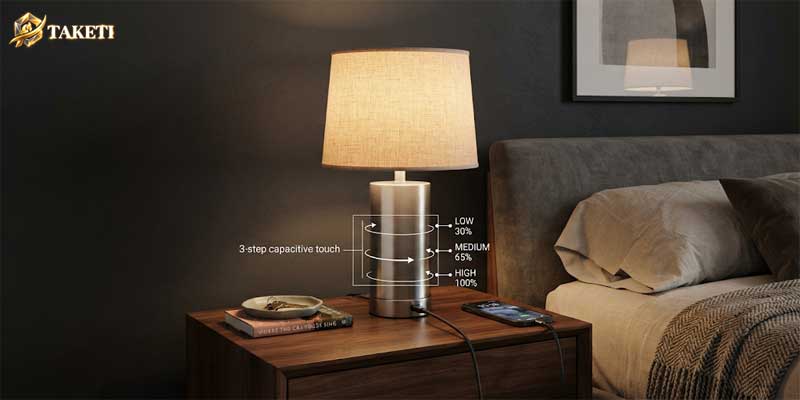
Few lighting designs offer the seamless everyday utility of a well-engineered touch lamp. Eliminating the frustration of feeling around in a pitch-dark room for an elusive rotary switch, an inline cord toggle, or a pull chain, these fixtures respond instantly to a simple tap of your hand. Whether positioned beside a master bed for late-night reading or stationed on an office credenza, investing in a reliable touch lamp fundamentally improves room ergonomics.
Yet, buying a sensor fixture comes with unique electrical and mechanical nuances that standard switch fixtures do not possess. Consumers frequently encounter flickering LED bulbs, phantom triggering in the middle of the night, unresponsive sensors, or premature driver failure. Selecting the ideal fixture demands a clear grasp of internal capacitive circuitry, ground integrity, step-dimming modules, and proportional placement. Combining modern convenience with coordinated design, such as integrating curated Bedroom Table Lamps, turns functional task light into an enduring decor centerpiece.
The Physics Behind a Capacitive Touch Lamp
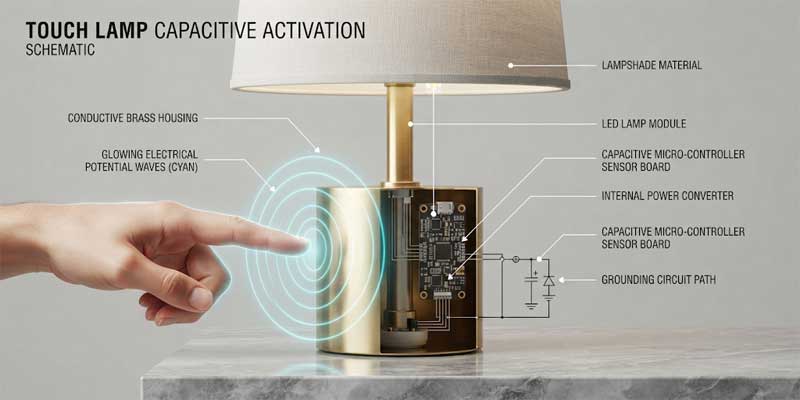
Unlike conventional mechanical lamps that rely on physical contact breakers to open or close an electrical loop, a modern touch lamp relies on capacitive sensing. The entire metallic chassis of the fixture—typically constructed from conductive brass, steel, or aluminum—acts as an extended electrostatic antenna connected directly to an internal micro-controller board housed within the base.
The human body carries its own natural electrostatic charge and electrical capacitance. Under static conditions, the lamp’s internal oscillator circuit maintains a steady electrical baseline across its conductive exterior. When your finger touches any part of the metal surface, your body alters the circuit’s total capacitance, leaking a negligible amount of radio-frequency energy to earth ground. The internal sensor detects this precise drop in potential voltage within milliseconds, recognizing it as an intentional command to cycle the lighting state.
Because the mechanism relies on electrical potential differences, the structural material of the fixture determines its long-term durability. Quality units feature thick, machined metal bodies that dissipate static charges evenly. Lower-grade fixtures often use painted or coated pot metals that insulate the surface, resulting in dead zones where touching the base fails to trigger the sensor.
3 Critical Mechanical and Electrical Flaws in Any Touch Lamp
While touch-activation provides unmatched convenience, understanding the common electrical pitfalls helps buyers steer clear of poorly manufactured units:
1. Incompatible LED Bulbs and Strobe Flickering
Historically, touch control modules were engineered specifically around resistive incandescent filaments. When contemporary homeowners attempt to insert modern energy-efficient bulbs, electrical mismatch is common. A standard non-dimmable LED contains an internal bridge rectifier and smoothing capacitor that cannot handle chopped alternating current (AC) waveforms produced by phase-cut dimmer boards. Screwing an incompatible bulb into a touch lamp results in annoying high-frequency strobing, audible buzzing from the base, or complete sensor lockup. You must verify that replacement bulbs are clearly labeled as dimmable and rated for electronic low-voltage or TRIAC dimmers.
2. Parasitic Capacitance and “Ghost Switching”
One of the most persistent complaints regarding any sensor-driven touch lamp is phantom activation—the lamp unexpectedly illuminating or changing brightness levels on its own at night. This issue rarely stems from a defective sensor; instead, it is caused by electromagnetic interference (EMI) or radio-frequency interference (RFI). High-draw appliances sharing the same electrical branch circuit—such as refrigerator compressors, air conditioners, or substandard laptop power bricks—generate transient voltage spikes on the home’s neutral lines. The internal sensor misinterprets these high-frequency ripples as a human finger tap, cycling the fixture automatically.
3. Floating Grounds and Polarized Outlet Dependency
Capacitive circuits require a stable reference to ground to register body capacitance accurately. In older residences that feature ungrounded two-prong outlets, or in receptacles with reversed polarity, the lamp cannot establish a dependable reference baseline. Consequently, your touch lamp may become hypersensitive, triggering from static electricity generated by nearby footsteps on synthetic carpet, or conversely, refuse to activate unless the user firmly grasps the metal stem with an entire palm.
| Technical Component | Standard Switch Fixtures | Capacitive Touch Lamp |
|---|---|---|
| Switching Mechanism | Mechanical toggle, rotary knob, or inline cord switch | Solid-state micro-controller detecting capacitance variance |
| Dimming Flexibility | Single fixed luminosity (requires wall dimmer installation) | Integrated 3-stage or 4-stage phase-cut stepped dimming |
| Bulb Compatibility | Accepts any bulb within socket wattage thresholds | Strictly requires dimmable LEDs or traditional incandescent bulbs |
| Susceptibility to Noise | Completely immune to EMI, RFI, and RF line interference | Sensitive to power surges, unshielded transformers, and floating ground |
| Darkness Usability | Requires physical fumbling, risk of knocking over bedside items | Instantaneous 360-degree contact anywhere across base or stem |
Essential Selection Rules for Modern Interiors
When selecting a touch lamp for long-term domestic use, evaluating structural quality alongside aesthetic proportions guarantees high satisfaction:
1. Stepped Dimming Profiles Built for Real-Life Tasks
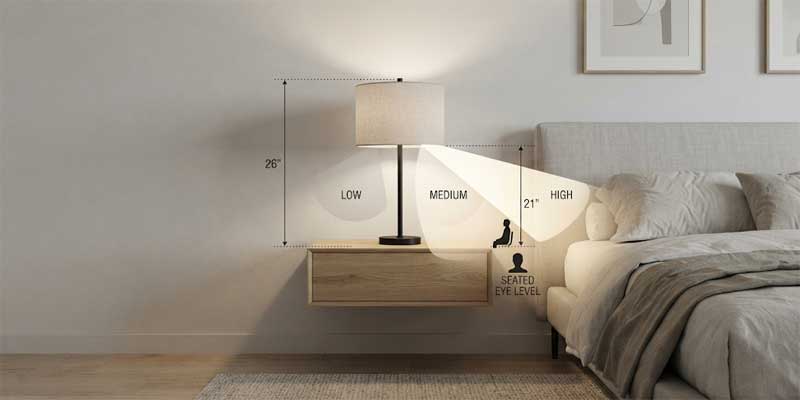
A quality touch lamp should offer balanced, functional lumen gradations rather than arbitrary intervals. Look for a 3-way dimming cycle that provides meaningful differences:
- Stage 1 – Low Accent (10% to 20% output, ~100-150 lumens): Intended exclusively for late-night waking. This ultra-warm glow prevents painful pupil constriction while safeguarding melatonin production.
- Stage 2 – Ambient Relax (45% to 60% output, ~400-500 lumens): The workhorse setting for wind-down hours, casual conversation, media viewing, and ambient room warmth.
- Stage 3 – High Task (100% output, ~800+ lumens): Direct illumination intended for focused book reading, document review, or crafts without straining the optic nerve.
2. Integrated Fast-Charging Technology
Because nightstands and side tables are prime real estate, cluttering the space with separate charging bricks and tangle-prone cables degrades bedroom harmony. Look for sensor lamps that build USB-A and modern 20W Power Delivery (PD) Type-C ports directly into the cast iron base. Ensure the internal power transformer for the charging ports is shielded independently from the sensor control module; otherwise, charging an iPad or phone will introduce electronic hum into the capacitive board.
3. Proportion and Eye-Level Alignment
Proportion remains critical when pairing your lamp with surrounding furniture. In communal lounges, incorporating well-scaled Table Lamps For Living Room creates intentional balance against sofa armrests and console tables. On standard 24- to 28-inch high nightstands, ensure your touch lamp has a total height that places the bottom edge of the lampshade level with your eyes when seated in bed. This direct sightline prevents exposure to the unshielded glare of the bulb while maximizing usable light projection across your bedside book or tablet.
For more architectural styles, material selections, and decorative options that elevate everyday spaces, explore the complete range at Table Lamp.
Step-by-Step Diagnostic Guide: Fixing Touch Lamp Malfunctions
If your touch lamp begins acting erratically, fails to dim, or stays permanently on, follow this structured diagnostic workflow before discarding the fixture:
- Verify the Bulb Type: Remove the bulb and examine the base etching. If it does not explicitly print “Dimmable,” swap it out for a certified dimmable LED bulb (warm white 2700K is strongly recommended for sleep environments).
- Perform a Hard Power Reset: Unplug the cord from the wall outlet and leave it disconnected for at least 60 seconds. This allows internal capacitors within the control module to fully discharge residual voltage, clearing transient software glitches from the micro-controller chip.
- Isolate Electrical Interference: Relocate the touch lamp temporarily to a different circuit in another room. If the ghost switching ceases, the original outlet is sharing a circuit with a noisy inductive motor (such as a ceiling fan or mini-fridge) or an unshielded power strip. Installing an inline ferrite core choke on the power cord can damp high-frequency noise.
- Check Plug Polarity: If the unit uses an unpolarized two-prong plug, try rotating the plug 180 degrees before inserting it into the wall socket. Correcting the relationship between line and neutral lines frequently resolves sluggish or hypersensitive touch behavior.
- Clean the Conductive Base: Unplug the unit and inspect the brass or steel body. Buildup of household polish, skin oils, or fine airborne dust creates an insulative dielectric barrier that dulls capacitive transfer. Thoroughly clean the exterior using a dry microfiber cloth before reconnecting power.
- Replace a Failed Dimmer Module: If your touch lamp remains stuck in an “always on” or “always off” state despite bulb swaps and resets, the internal triac within the base control box has likely shorted from an electrical surge. Replacement universal 3-way capacitive sensor modules are inexpensive and readily wired into the base with standard wire nuts.
Ultimately, choosing the right touch lamp transforms your lighting experience from a mundane chore into effortless convenience. By insisting on dimmable LED compatibility, solid conductive housing, and isolated charging circuitry, you ensure your fixture delivers clean illumination and responsive control for years to come.
